90 Free Profile Pictures
One-Click Copy & Download
Neutral or Transparent Backgrounds
Multiple Sizes & Formats

Profile Picture Placeholders
for Websites & UI Design

Realistic profile picture placeholders for websites, apps, and UI mockups. Choose from 90 natural-looking user avatars to bring your designs to life. Copy images in one click or download them in your preferred size and format. No sign-up needed.

ⓘ All avatars are AI-generated and are not intended to represent real people. Please review our Terms of Service for usage conditions and restrictions.

Why Choose LoremKit for Profile Picture Placeholders?

Profile Picture Placeholders

Nobody wants a profile picture with half the head cut off. Our avatars are centered with enough room around the face and shoulders, making them a great fit for circular profile pictures, user cards, and other UI elements.

Realistic Avatar Placeholders, Different Faces

A user list looks strange when everyone looks the same. LoremKit offers realistic avatar photos with different ages, hairstyles, facial features, and expressions, helping your sample profiles feel more natural and less repetitive.

Professional or Casual? <br /> Your Choice

Some projects need business-style headshots, while others feel better with relaxed, everyday portraits. You'll find both in our collection, so it's easy to choose profile pictures that match the mood of your design.

Backgrounds That Work <br /> With Your Design

Choose a profile image placeholder with its original background for a natural photo look, or switch to a transparent version when you need more flexibility. Both options work nicely in profile cards, dashboards, and app layouts.

Multiple Profile Picture <br /> Sizes & Formats

No need to resize every picture yourself. Pick the size that fits your layout and download your avatar in PNG, JPEG, SVG, or WebP. From tiny user icons to larger profile images, you're covered.

Copy User Avatars <br /> and Names in One Click

Why spend time inventing names for sample users? Every avatar comes with a fictional name you can copy separately. Grab the image, copy the name, and fill your mockup without the extra work.

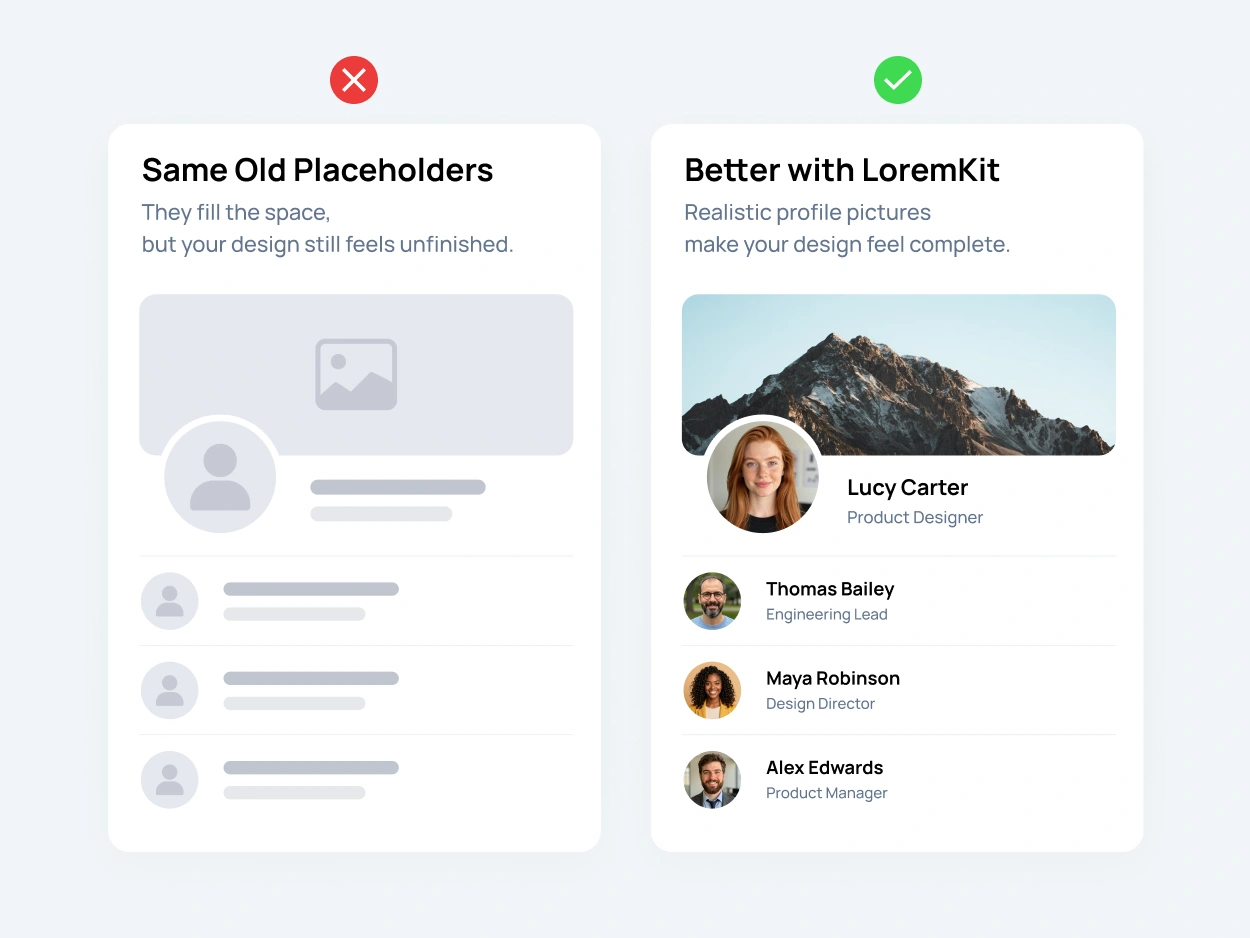
Before-and-after UI mockup comparing empty avatar placeholders with realistic profile picture placeholders and user avatar photos.

The Missing Photo
Shouldn't Hold Up Your Design

Even a well-designed mockup can feel unfinished when profile pictures are missing. You might have the layout, typography, and buttons just right, but empty circles and gray boxes don’t really show how the finished design will look.

Adding realistic profile picture placeholders can make a big difference. Natural-looking faces bring life to user profiles, team sections, comment feeds, and app interfaces. They make your mockups feel more complete and believable, especially when you’re presenting a design to a client. Plus, it’s much easier to check image crops, spacing, and alignment when there’s an actual face in the frame.

That’s where LoremKit comes in. Instead of leaving empty spaces or waiting for final photos, choose from ready-made realistic user avatars. Copy an image straight into Figma or another compatible design tool, or download it for your website or app mockup. A small detail like a good profile photo can make the whole design feel much closer to the finished product.

Create Realistic User Profiles
Without Real User Data

A good-looking profile card needs more than just a photo. There’s usually a name, a short bio, maybe a job title or a comment. And when you’re designing an entire dashboard or community page, coming up with all that sample content can become a task of its own.

Instead of borrowing someone’s photo or using actual customer information, you can build believable demo profiles with LoremKit. Choose a realistic profile picture placeholder, copy its fictional name, and add a short description using our Realistic Text Generator. Just like that, you’ve got a sample user who looks right at home in your mockup.

Need more than one? Mix different avatar photos, names, and descriptions to fill team pages, member directories, or comment sections. Try both short and long names to see how your layout handles them. It’s a simple way to catch awkward spacing, overflowing text, and repetitive-looking profiles before showing the design to a client.

And when the real content finally arrives, you can replace the placeholders without starting your design all over again.

FAQ

A profile picture placeholder is a temporary image used when the final profile photo isn’t available yet. It helps fill empty spaces in websites, apps, and UI mockups. A placeholder can be a simple icon, initials, or a realistic photo. In digital interfaces, this type of image is also called a user avatar.

You can find 90 realistic profile picture placeholders in the LoremKit avatar collection. There’s no need to create an account or generate images yourself. Just choose a portrait, copy it, or download it in your preferred size and format. They’re especially handy for website previews, Figma designs, and sample user profiles.

A default profile icon usually shows a simple silhouette or initials. It’s great for empty accounts and early wireframes. A realistic avatar placeholder uses an actual-looking face, which helps you see how a finished interface might feel. If you’re preparing a client presentation or detailed UI mockup, profile photos can make the design look much more complete.

Absolutely! You can copy realistic user avatars from LoremKit and paste them directly into Figma or another compatible design tool. They work nicely in profile cards, dashboards, chat interfaces, and mobile app mockups. Each avatar also comes with a fictional name you can copy separately, so creating sample user profiles takes even less effort.

Yes! LoremKit lets you switch between original and transparent backgrounds. Transparent profile images are useful when you want to place a portrait over a custom color or background in your design. You can also choose from PNG, JPEG, SVG, and WebP formats. For transparency, PNG and WebP are particularly useful.

No. LoremKit’s realistic avatar photos are AI-generated, a form of synthetic media. They’re designed to represent fictional users rather than actual people. That makes them useful for sample accounts and interface previews without borrowing someone’s personal photographs. Accidental resemblance to real individuals is still possible.

Start with a mix of different faces instead of repeating the same avatar everywhere. Add fictional names, job titles, and short descriptions to make each profile feel different. LoremKit lets you copy avatar images and names, while our Realistic Text Generator can help fill the remaining spaces. It’s a simple way to create believable demo profiles without using real customer data.

LoremKit avatars are free to copy and download for design and creative projects, including website and app mockups. If you’re planning to use them on a published website or in a commercial project, make sure your intended use follows our <a href=”https://loremkit.com/terms-of-service/” target=”_blank” rel=”noopener”>Terms of Service</a>. The images represent fictional people and shouldn’t be presented as photographs of actual customers or employees.

More Tools for Better Mockups

Your profile pictures are ready. Now give them something to say! Add sample text, fix text formatting, and make your designs feel a little more complete.

Realistic Text Generator

Create natural-sounding sample text for profiles, UI cards, and other places where classic Lorem Ipsum feels a little out of place.

Ready Text Cards

Grab ready-made headlines, paragraphs, lists, and FAQs for your layouts. Just pick what you need, copy it, and keep designing.

Case Converter

Quickly change text to uppercase, lowercase, title case, and more. Perfect for fixing headings, labels, and other text in your designs.